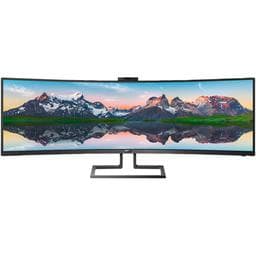
Philips 499P9H 48.8" 5120 x 1440 70 Hz Curved Monitor
As an Amazon Associate we earn from qualifying purchases.
Key Highlights
- 5120 x 1440 Resolution
- 70 Hz Refresh Rate
- Built-in Speakers
Monitor Properties
What these values mean
Spec sheets are written to sell a monitor, not to explain it. These notes cover what each value changes in everyday use.
The company that designs, sells, and services the monitor. It is usually not the company that made the panel inside, and it handles warranty claims.
The diagonal measurement of the image area in inches. A larger panel is not automatically sharper: pixel density also depends on resolution and viewing distance.
The number of physical pixels across and down. More pixels fit more on screen and sharpen text, but they also demand more from the graphics card and often need display scaling.
How many times per second the panel can draw a new frame. 60 Hz is fine for office work; 120 Hz and above make scrolling, animation, and fast camera movement look smoother.
How quickly a pixel changes shade, measured in milliseconds. Lower values reduce smearing in fast motion, though vendors measure this differently, so compare like-for-like reviews.
The display technology. IPS gives wide viewing angles and stable colours, VA gives deeper contrast but slower motion, TN is fast and cheap but narrow, and OLED switches individual pixels for true blacks.
The width-to-height ratio of the image area. 16:9 is the standard, 21:9 ultrawide adds horizontal space, and 16:10 adds height that suits documents and code.
The colour of the stand and bezel. Cosmetic only; it has no effect on the picture.
Luminance in candela per square metre (cd/m², or nits). Around 250 nits suits a dim office, 300–350 nits copes with daylight, and 400 nits or more is where HDR starts to become meaningful.
The distance between the centres of two pixels in millimetres. A smaller pitch means a denser, sharper image at the same size; it is another way of expressing pixel density.
Whether the panel is wider than the old 4:3 and 5:4 shapes. Almost every current monitor is widescreen, so a "No" here usually marks an older or specialist model.
Whether the panel bends toward the viewer. A curve keeps the edges of very wide screens at a comfortable distance; flat panels are easier for precise line work.
Adaptive-sync support (FreeSync or G-Sync Compatible). It lets the monitor match the graphics card's frame rate to avoid tearing and stutter in games.
Speakers built into the monitor. They are useful for a tidy desk or a quick video call, but almost always sound thinner than separate speakers or headphones.
The angle at which contrast falls to a usable minimum, usually quoted as 178° for IPS and OLED. Wider is better for shared viewing; a single user sitting straight on notices less.
The video and data connectors on the monitor, such as HDMI, DisplayPort, and USB-C. Match them to your devices; USB-C can carry video, data, and laptop charging over one cable.
Values are taken from the manufacturer's published specifications and may vary by revision.
Specification source: View the original product listing
More monitors from Philips
Other models from the same manufacturer, across sizes and price points.
- PhilipsPhilips Evnia 24M2N3201A/00 23.8" 1920 x 1080 180 Hz Monitor23.8" · 1920 x 1080
- PhilipsPhilips Evnia 34M2C6500 34.0" 3440 x 1440 175 Hz Curved Monitor34" · 3440 x 1440
- PhilipsPhilips Evnia 34M2C8600 34.0" 3440 x 1440 175 Hz Curved Monitor34" · 3440 x 1440
- PhilipsPhilips 241B7QPJKEB 23.8" 1920 x 1080 60 Hz Monitor23.8" · 1920 x 1080
Other 48.8" monitors
Same screen size, different panels and features.
- SamsungSamsung Odyssey G9 C49G97T 48.8" 5120 x 1440 240 Hz Curved Monitor48.8" · 5120 x 1440
- PhilipsPhilips 498P9 48.8" 5120 x 1440 70 Hz Curved Monitor48.8" · 5120 x 1440
- PhilipsPhilips 49B2U6900CH 48.8" 5120 x 1440 75 Hz Curved Monitor48.8" · 5120 x 1440
- AOCAOC AG493UCX2 48.8" 5120 x 1440 165 Hz Curved Monitor48.8" · 5120 x 1440