Best 144Hz Ultrawide Monitors
The best 144Hz ultrawide monitors combine a wide 21:9 screen with a high refresh rate, giving you more workspace and smoother motion in games and everyday use. For gamers, creators, multitaskers, and anyone who wants a more immersive desktop setup, a 144Hz ultrawide monitor can be a significant upgrade over a standard 60Hz or 75Hz display. The 34-inch 3440x1440 format is particularly popular because it offers a useful balance between screen size, sharpness, and GPU requirements. Models such as the LG 34GN850-B, Alienware AW3423DWF, and Samsung Odyssey G5 show how different panel technologies can target different types of users. For a full comparison of the current 34-inch market, see our best 34-inch ultrawide monitors article
What makes the best 144Hz ultrawide monitor?
A good 144Hz ultrawide monitor needs more than a high refresh rate. The best models combine a fast refresh rate with a suitable resolution, good motion handling, strong image quality, adaptive sync, and an ergonomic design. A 144Hz refresh rate means the display can update the image up to 144 times per second. This can make mouse movement, scrolling, camera movement, and fast gameplay look noticeably smoother than on a traditional 60Hz display. The ultrawide format adds another important advantage. A 21:9 display gives you more horizontal space than a conventional 16:9 monitor, making it easier to keep multiple windows visible at the same time. For gaming, that wider screen can also create a more immersive field of view in games that properly support ultrawide resolutions.
A 21:9 display gives you more horizontal space than a conventional 16:9 monitor, making it easier to keep multiple windows visible at the same time. If you are still trying to decide which aspect ratio or screen size is right for your desk, start with our complete ultrawide monitor guide.
Best 144Hz ultrawide monitors at a glance
Here are three strong options to consider:
| Monitor | Panel | Resolution | Refresh Rate | Best For |
|---|---|---|---|---|
| Alienware AW3423DWF | QD-OLED | 3440x1440 | 165Hz | Best overall |
| LG 34GN850-B | Nano IPS | 3440x1440 | 144Hz / 160Hz OC | Best IPS option |
| Samsung Odyssey G5 34" | VA | 3440x1440 | 165Hz | Best value |
These monitors take different approaches. The Alienware focuses on OLED image quality and gaming performance, the LG offers a strong combination of IPS image quality and fast motion, while the Samsung provides a more affordable route into the 34-inch ultrawide format.
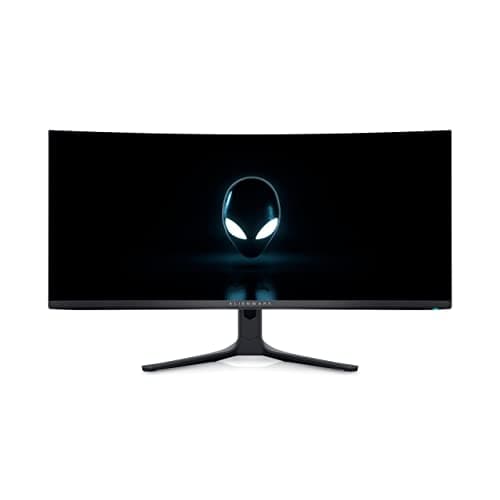
Alienware AW3423DWF - Best 144Hz ultrawide monitor overall
The Alienware AW3423DWF is one of the strongest choices if you want a premium 144Hz-class ultrawide gaming monitor. It uses a 34-inch 3440x1440 QD-OLED panel and supports a 165Hz refresh rate, giving it additional headroom over a standard 144Hz display. Independent testing continues to rate it highly for gaming, with excellent contrast, HDR performance, and motion handling. The biggest advantage is the QD-OLED panel. OLED technology can produce extremely deep blacks because individual pixels can effectively turn off when displaying dark content. That makes games and movies look particularly immersive, especially in a darker room. The 165Hz refresh rate also makes the AW3423DWF a strong choice for fast-paced games. When your graphics card can produce high frame rates, the combination of a fast panel and ultrawide resolution can make movement feel exceptionally smooth. There is one important consideration: OLED displays can be susceptible to burn-in when static elements are displayed for long periods. If you use your monitor primarily for office work with static windows, taskbars, or application interfaces, this should be part of your buying decision.
As an Amazon Associate we earn from qualifying purchases.
Product specifications
- Manufacturer
- Dell
- Widescreen
- Yes
- Aspect Ratio
- 21:9
- Screen Size
- 34.18"
- Resolution
- 3440 x 1440
- Response Time
- 0.1 ms
- ✓ Premium gaming
- ✓ HDR
- ✓ Movies

LG 34GN850-B - Best 144Hz ultrawide IPS monitor
The LG 34GN850-B is an excellent choice if you want the advantages of an ultrawide gaming monitor without moving to OLED. It features a 34-inch 3440x1440 Nano IPS panel, a native 144Hz refresh rate, and an overclocked mode reaching 160Hz. LG also lists 1ms-class response time, NVIDIA G-SYNC compatibility, and DisplayHDR 400 support among its key features. Its IPS panel gives the monitor wide viewing angles and strong color performance, making it particularly versatile for users who split their time between gaming, productivity, and creative work. The LG is also strong when it comes to motion clarity. Independent testing found the 34GN850 to have very good response-time performance, while its 160Hz overclock provides a little more refresh-rate headroom than a traditional 144Hz display. Compared with a VA display, the IPS panel offers a different balance. You generally get wider viewing angles and strong motion performance, while VA models can offer deeper native contrast. The LG therefore makes sense for users who want one screen that can handle gaming during the evening and productivity or creative work during the day.
As an Amazon Associate we earn from qualifying purchases.
Product specifications
- Manufacturer
- LG
- Widescreen
- Yes
- Aspect Ratio
- 21:9
- Screen Size
- 34"
- Resolution
- 3440 x 1440
- Response Time
- 1 ms
- ✓ Gaming
- ✓ Productivity
- ✓ Creative work
Samsung Odyssey G5 34-inch - Best value 144Hz ultrawide monitor
The Samsung Odyssey G5 34-inch is a good option for shoppers who want a large 3440x1440 ultrawide gaming monitor without moving into premium OLED pricing. The G5 uses a VA panel with a 3440x1440 resolution and a 165Hz refresh rate. Samsung's specifications also include a dramatic 1000R curve, 1ms MPRT response time, HDR10, and AMD FreeSync Premium. The 1000R curve is one of the monitor's defining characteristics. It wraps the screen more aggressively around your field of view, which can make racing games, simulators, shooters, and cinematic games feel more immersive. The VA panel also provides stronger native contrast than many IPS displays. This can be useful for games and movies where darker scenes are important. However, the Samsung does make some compromises compared with higher-end IPS and OLED models. Independent testing found the LG 34GN850-B to have faster response performance and better overall gaming performance, while the Samsung's VA panel provides higher contrast. For buyers focused primarily on getting a large, curved, high-refresh ultrawide display, however, the G5 remains an appealing option.
As an Amazon Associate we earn from qualifying purchases.
Product specifications
- Manufacturer
- Samsung
- Widescreen
- Yes
- Aspect Ratio
- 21:9
- Screen Size
- 34"
- Resolution
- 3440 x 1440
- ✓ Budget-conscious gamers
- ✓ Immersive Gaming
- ✓ high-refresh ultrawide setups
Why choose a 144Hz ultrawide monitor?
The biggest advantage of a 144Hz ultrawide monitor is that it improves two parts of the display experience at the same time: width and motion.
A standard 16:9 monitor gives you a familiar workspace, but an ultrawide monitor provides additional horizontal room. You can place two applications side by side without making either one unnecessarily small.
For example, you could have a browser open next to a document, a video editing timeline beside a preview window, or a game alongside chat and streaming software.
The 144Hz refresh rate adds smoothness to that larger workspace. Scrolling through a long webpage, moving windows around the desktop, and navigating through a game can all feel more fluid.
This is why a 144Hz ultrawide monitor can work particularly well as a single-monitor replacement for a dual-monitor setup.
Is 144Hz enough for an ultrawide gaming monitor?
For most gamers, 144Hz is still a very strong refresh rate for an ultrawide monitor. You do not necessarily need 240Hz or higher to get a smooth gaming experience.
The important factor is whether your computer can actually produce enough frames to take advantage of the monitor's refresh rate.
A 3440x1440 ultrawide display has significantly more pixels than a 2560x1440 monitor. Modern games can therefore place a much larger workload on your graphics card.
If your GPU can consistently produce around 100 to 144 frames per second in the games you play, a 144Hz-class ultrawide can make excellent use of that performance.
If your system only produces 50 to 70 FPS at 3440x1440, you can still benefit from the larger display, but the high refresh rate will not be used to its full potential.
What resolution is best for a 144Hz ultrawide monitor?
For a 34-inch ultrawide, 3440x1440 is one of the most popular resolutions. It provides a 21:9 aspect ratio while offering considerably more detail than a 2560x1080 ultrawide.
The resolution also strikes a useful balance between image sharpness and GPU requirements. Many current 34-inch ultrawide gaming monitors use this resolution, including the Alienware AW3423DWF and LG 34GN850-B.
For productivity, 3440x1440 gives you enough horizontal space to work with multiple applications while maintaining a relatively sharp image.
For gaming, it provides a wider field of view without requiring the graphics power needed by much larger 4K or super-ultrawide displays.
144Hz vs 165Hz: does it matter?
The difference between 144Hz and 165Hz is relatively small. Both are high-refresh-rate options that can provide a smooth gaming experience.
A 165Hz monitor refreshes the screen slightly more often, but it should not be the deciding factor when choosing between two monitors.
Panel quality, response times, HDR performance, contrast, adaptive sync, resolution, ergonomics, and price can all have a much larger impact on the overall experience.
That is why a good 144Hz IPS monitor can still be a better purchase than a weaker 165Hz display.
In fact, several of the best 144Hz-class ultrawide monitors now operate above 144Hz. The LG 34GN850-B can reach 160Hz with overclocking, while the Alienware AW3423DWF reaches 165Hz.
IPS vs VA vs OLED for a 144Hz ultrawide
Panel technology is one of the most important decisions when choosing an ultrawide monitor.
IPS
IPS panels are a strong choice for users who want good viewing angles, strong color performance, and reliable motion handling.
The LG 34GN850-B is a good example of this approach. Its Nano IPS panel makes it suitable for both gaming and productivity.
VA
VA panels generally provide stronger native contrast than IPS, which can make dark scenes look deeper.
The Samsung Odyssey G5 uses a VA panel and combines it with a strong 1000R curve, making it particularly focused on immersive gaming.
OLED
OLED is the premium option for contrast and image quality. QD-OLED displays such as the Alienware AW3423DWF can produce exceptionally deep blacks and strong HDR performance.
The trade-off is the possibility of burn-in with prolonged static content, so OLED is not automatically the best choice for every productivity-heavy setup.
What should you look for in a 144Hz ultrawide monitor?
Before buying a 144Hz ultrawide monitor, consider more than refresh rate.
1. Resolution
For a 34-inch display, 3440x1440 is a strong target. It provides a useful combination of screen space and image sharpness.
2. GPU performance
Higher resolutions require more graphics power. Make sure your GPU can deliver the frame rates you want at 3440x1440.
3. Adaptive sync
FreeSync, G-SYNC compatibility, or another variable refresh rate technology can help reduce tearing and make gameplay smoother when frame rates fluctuate.
4. Response time
A high refresh rate is more useful when the panel can transition between frames quickly. Look beyond the advertised 1ms number and consider independent testing where available.
5. Panel type
Choose IPS for versatility, VA for stronger native contrast and value, or OLED for premium contrast and HDR.
6. Curve
A curved ultrawide can feel more immersive, but the ideal curve depends on your desk distance and personal preference. The Samsung Odyssey G5's 1000R curve is considerably more aggressive than the gentler curves found on some other 34-inch models.
7. Connectivity
Check that the monitor has the DisplayPort and HDMI connections you need, particularly if you plan to connect multiple computers or gaming devices.
8. Ergonomics
A height-adjustable stand, tilt adjustment, and VESA mounting support can make a large difference during long sessions.
Are 144Hz ultrawide monitors good for productivity?
Yes. A 144Hz ultrawide monitor can be an excellent productivity display, especially if you regularly work with multiple applications.
The additional horizontal space can reduce the need to constantly switch between windows. You can keep a browser, document, messaging application, or reference material visible at the same time.
The high refresh rate is also useful outside gaming. Scrolling through documents and websites, moving windows, and navigating large spreadsheets can feel smoother than on a standard 60Hz display.
However, productivity users should pay close attention to text clarity, panel layout, brightness, and ergonomics. OLED can provide excellent image quality, but users who spend many hours with static desktop interfaces should also consider the potential for burn-in.
Are 144Hz ultrawide monitors good for gaming?
If you want to see options with even higher refresh rates (like 240Hz) or massive 49-inch curved screens, check out our broader roundup of the best ultrawide gaming monitors
For gaming, a 144Hz ultrawide can be an excellent combination of immersion and responsiveness.
The 21:9 aspect ratio provides a wider view in games that support ultrawide resolutions. Racing games can benefit from the additional peripheral view, while open-world and simulation games can feel more cinematic.
Fast-paced games can also benefit from the higher refresh rate. At sufficiently high frame rates, 144Hz provides noticeably smoother motion than 60Hz.
Keep in mind that ultrawide support varies between games. Some titles may have limited 21:9 support, unusual cutscene behavior, or restrictions on field of view.
If you are buying a monitor specifically for a small selection of games, check their ultrawide compatibility before making a purchase.
Which 144Hz ultrawide monitor should you buy?
The best choice depends on what matters most to you.
The Alienware AW3423DWF is the strongest choice if you want premium gaming performance, OLED contrast, and excellent HDR. It combines a 34-inch 3440x1440 QD-OLED panel with a 165Hz refresh rate.
The LG 34GN850-B is a better fit if you prefer IPS and want a versatile display for gaming, productivity, and creative work. Its 144Hz refresh rate and 160Hz overclock provide plenty of speed without moving to OLED.
The Samsung Odyssey G5 34-inch makes more sense for buyers who want a high-refresh 3440x1440 ultrawide with a strongly curved VA panel and a focus on value. Its 165Hz refresh rate and 1000R curve make it particularly appealing for immersive gaming.
Final thoughts
The best 144Hz ultrawide monitors combine the advantages of a larger workspace with the smoother motion of a high refresh rate. For many users, 34-inch 3440x1440 displays offer an ideal balance between immersion, productivity, image quality, and performance requirements.
The Alienware AW3423DWF stands out for premium OLED gaming, the LG 34GN850-B remains a strong all-around IPS option, and the Samsung Odyssey G5 34-inch offers an appealing high-refresh alternative for shoppers focused on value.
Before buying, consider your graphics card, desk space, preferred panel technology, gaming habits, and productivity needs. A monitor should not simply have the highest refresh rate or the biggest screen. The best 144Hz ultrawide monitor is the one that gives you the right combination of smoothness, image quality, workspace, and comfort for how you actually use your computer.