What Is Refresh Rate? Why It Matters - Plus a 50-Student Survey
What Is Refresh Rate, and Why Should You Change It?
If there is one setting that does more for a monitor than anything else in the menu, it is the refresh rate. We put a quick survey in front of 50 students, and 60% of them had never touched the thing. They bought a monitor, plugged it in, and quietly used a fraction of what the panel can do.
This is not only a gamer problem. The refresh rate decides how comfortable scrolling feels, how fast a mouse cursor answers, whether fast video splits with a tear line down the middle, and how tired your eyes get after a long session. Below is what it actually does, why it matters, and what the numbers say about who uses it.
What Is Refresh Rate?
Refresh rate, in hertz (Hz), is how many times per second a display redraws the whole image. A 60 Hz monitor redraws 60 times a second. A 144 Hz monitor redraws 144 times a second.
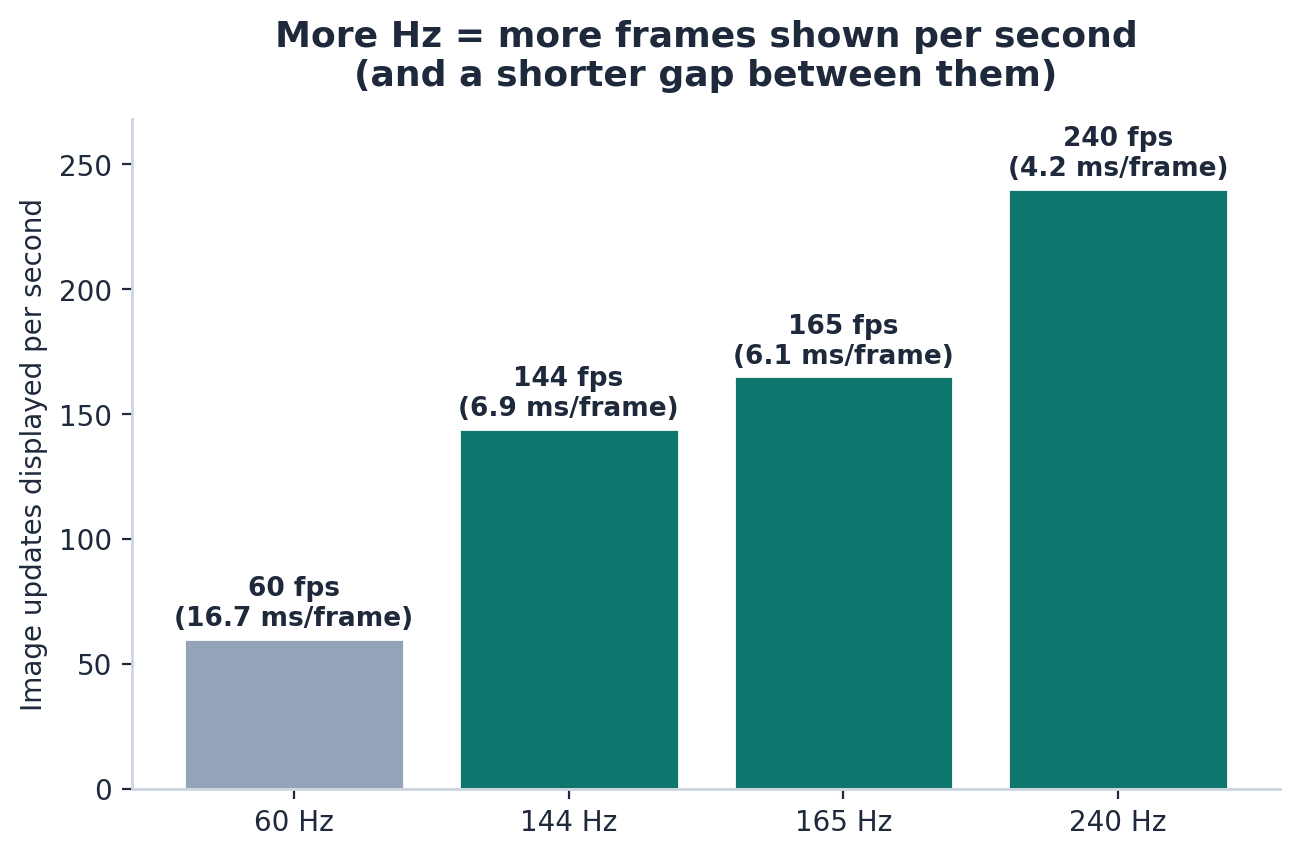
It is the display half of frames per second (FPS). Your GPU makes frames. The refresh rate decides how many of those frames can reach your eyes. When nothing is configured, what you actually see is roughly the lower of the two:
| Refresh rate | Images displayed per second | Time between frames |
|---|---|---|
| 60 Hz | 60 | 16.7 ms |
| 144 Hz | 144 | 6.9 ms |
| 165 Hz | 165 | 6.1 ms |
| 240 Hz | 240 | 4.2 ms |
So a higher refresh rate turns a slow, jumpy redraw into a fast, continuous stream of updates.
Why Refresh Rate Matters
The advantages are not marketing fluff. There are four worth keeping in mind.
1. Motion is smoother
When your eye tracks something moving, a cursor, a scroll, a pan, a 60 Hz display only updates every 16.7 ms, which comes across as stutter. At 144 Hz the updates land more than twice as often and motion reads as fluid. That is why a 144 Hz desktop feels fast even before anything in the game changes. The screen just stops fighting the frame.
2. Screen tearing goes away
If the GPU hands over frames faster than the display redraws, two frames can land in the same redraw and leave a horizontal tear line. A faster refresh, plus VSync or G-SYNC / FreeSync, keeps the updates inside the redraw cycle and hides that line.
3. Input lag drops
Display latency is about half a refresh cycle. A 60 Hz monitor adds roughly 8 ms of delay, a 144 Hz panel about 3.5 ms. In fast games and rhythm games, that half cycle is the difference between a clean hit and a miss.
4. Eyes tire less
Flicker and judder are a known cause of eye strain. A steadier picture, which a higher refresh gives you, is closer to what a long study session or an evening of coding wants.
The 50-student survey
We asked 50 students across majors, on a mix of laptops and desktops, two questions: what refresh rate their monitor is rated for, and what they actually had set in the operating system.
The headline: 60% never changed it
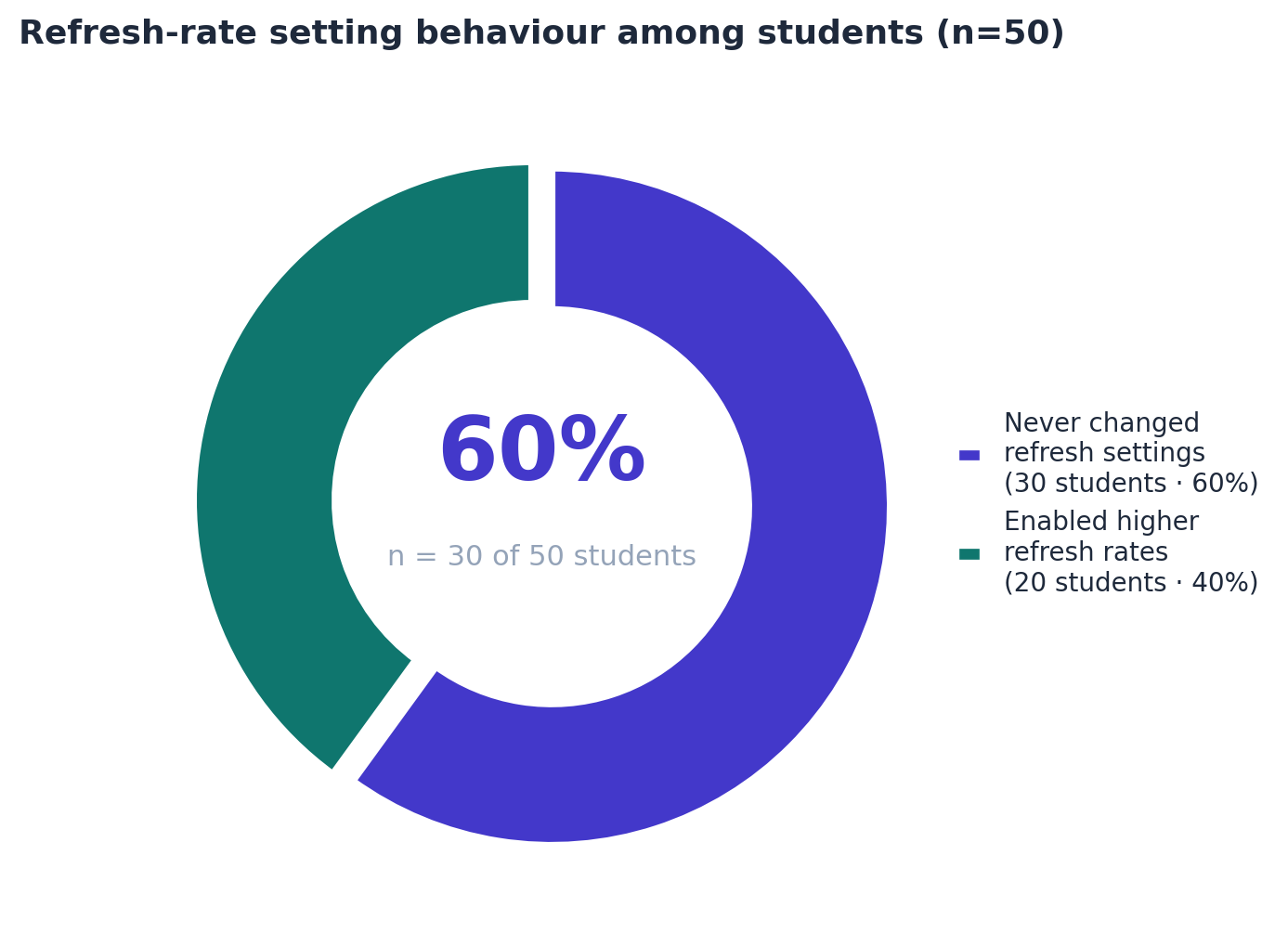
- 30 of 50, or 60%, had never opened the refresh rate setting.
- 20 of 50, or 40%, had enabled a higher rate on their monitor.
Only two students in five use what their display can do.
They own the hardware, then run it at 60 Hz
| Refresh rate | Own it | Actually run it |
|---|---|---|
| 60 Hz | 14 | 30 |
| 144 Hz | 22 | 15 |
| 165 Hz | 9 | 3 |
| 240 Hz | 5 | 2 |
Here is where it gets wasteful. 36 students own a monitor rated at 144 Hz or higher, but only 20 actually run above 60 Hz. Sixteen students own a panel that supports 144 Hz or more and leave it at 60. The hardware they paid for is sitting unused.
Why the 60% left the default alone
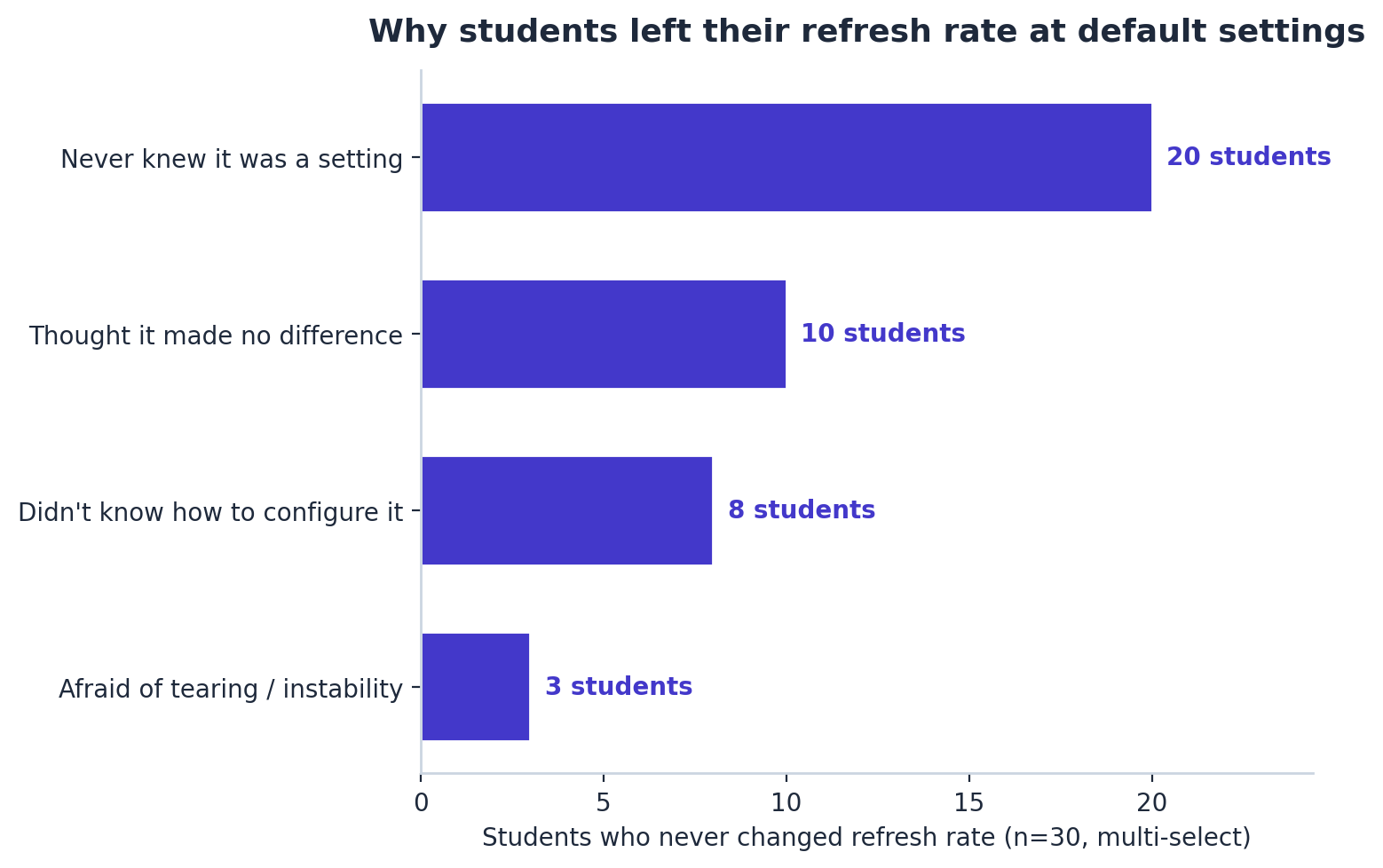
We let the 30 who never changed it pick reasons (multi-select, so the count goes over 30):
| Reason | Students |
|---|---|
| Never knew the setting existed | 20 |
| Thought it made no difference | 10 |
| Didn't know how to configure it | 8 |
| Afraid of tearing / instability | 3 |
The blocker is awareness, not hardware. "Never knew it was a setting" is the most common answer, 20 of 30. Only 3 were scared of screen tearing, which is exactly the thing a higher refresh rate fixes.
The 40% who changed it felt the difference
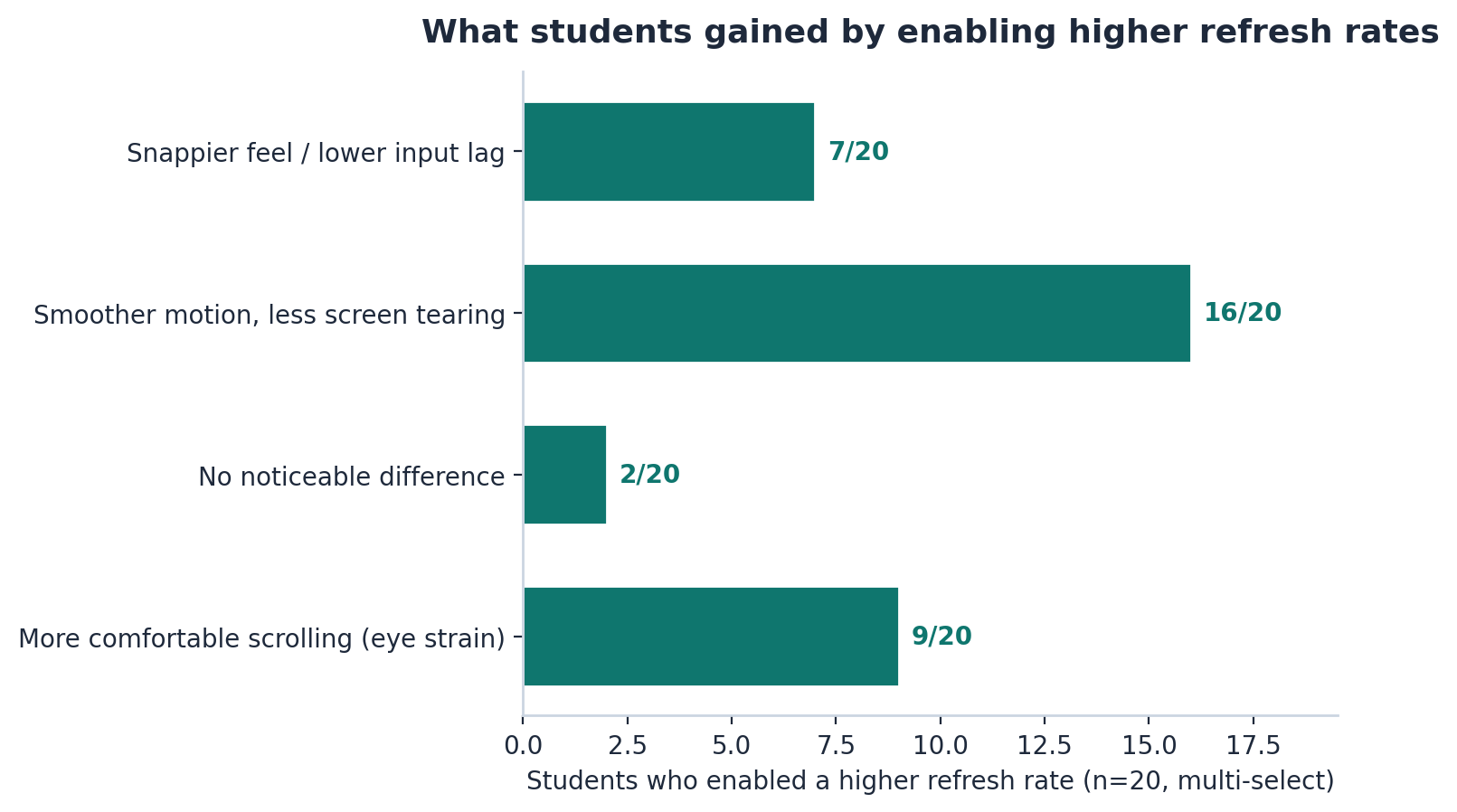
The 20 students who turned on a higher rate reported (multi-select):
| Benefit | Students |
|---|---|
| Smoother motion, less tearing | 16 |
| More comfortable scrolling | 9 |
| Snappier feel / lower input lag | 7 |
| No noticeable difference | 2 |
16 of 20, or 80%, noticed smoother motion and less tearing. Not everyone picks it up equally, motion sensitive people benefit the most, but the signal is consistent. Turning on the panel's real capability is a change people feel.
How to change yours
The upgrade you missed is one menu away.
- Windows: Settings, System, Display, Advanced display settings, then set the refresh rate to the highest value your monitor supports.
- macOS: System Settings, Displays, choose your display, set the refresh rate to the highest supported.
- If the highest option is greyed out, check the cable. 144 Hz and up usually needs DisplayPort or a compatible HDMI, and on laptops a USB-C cable that can carry the bandwidth. An old HDMI cable will hold you at 60.
FAQ
60% of the 50 students never changed their refresh rate, and 16 of them own a 144 Hz capable monitor while running it at 60 Hz. The fix costs nothing and takes one dropdown in the operating system. In return you get smoother scrolling, no tear lines, less input lag, and eyes that tire less, yet 60% leave it unused.
Methodlogy used was a survey of 50 stutents collected in september. Percentages are over n=50. Reasons and benefits were multi-select, so the sub total exceed 30 and 20. Charts were made with matplotlib.